i'm having a problem starting up, i used this bot before about a year ago, but changed PC and now i'm drawing a blank.
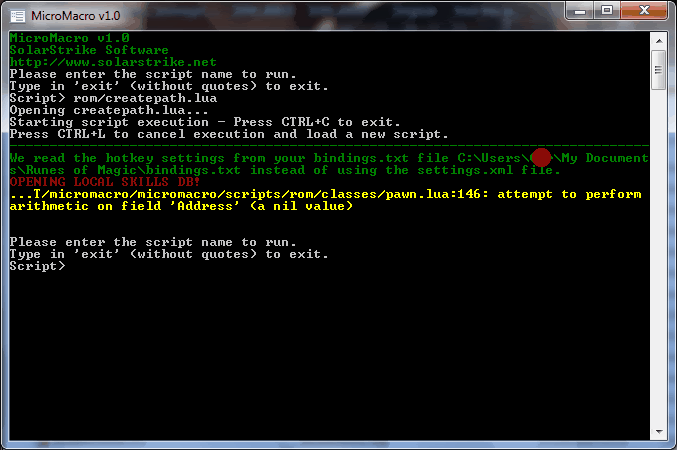
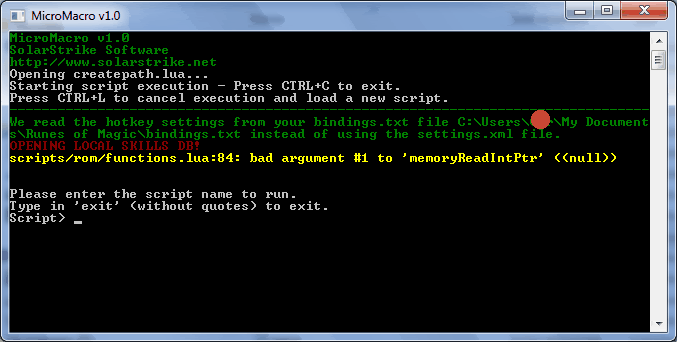
see pic.
i get this from opening micromacro and running rom/createpath.lua
http://i235.photobucket.com/albums/ee84 ... 102049.gif
and this from double-clicking the createpath batch file in the rom folder
http://i235.photobucket.com/albums/ee84 ... 102105.gif
any advice?
RoM Bot startup problem
RoM Bot startup problem
Last edited by foure on Sun Jul 11, 2010 4:20 pm, edited 1 time in total.

Re: RoM Bot startup problem
Maybe you just need to do a rom/update.lua to update the memory addresses?
- Please consider making a small donation to me to support my continued contributions to the bot and this forum. Thank you. Donate
- I check all posts before reading PMs. So if you want a fast reply, don't PM me but post a topic instead. PM me for private or personal topics only.
- How to: copy and paste in micromacro
________________________
Quote:- “They say hard work never hurt anybody, but I figure, why take the chance.”
- Ronald Reagan
Re: RoM Bot startup problem
Already tried that, and deleting the contents before SVN'ing the rom folder, i get this with rom/update.lua...
http://i235.photobucket.com/albums/ee84 ... 101020.gif
http://i235.photobucket.com/albums/ee84 ... 101020.gif

Last edited by foure on Sun Jul 11, 2010 4:21 pm, edited 1 time in total.
-
Administrator

- Site Admin
- Posts: 5353
- Joined: Sat Jan 05, 2008 4:21 pm
Re: RoM Bot startup problem
Provide a copy of addresses.lua.The Rules wrote:11. Do not post screenshots of text errors.
Re: RoM Bot startup problem
Oops, sorry, screenies removed 
Code: Select all
-- Auto-generated by update.lua
addresses = {
	camPtr_offset = 0x46C,
	camXUVec_offset = 0x128,
	camX_offset = 0x104,
	camYUVec_offset = 0x12C,
	camY_offset = 0x108,
	camZUVec_offset = 0x130,
	camZ_offset = 0x10C,
	castbar_offset = 0x25C,
	charAlive_offset = 0x224,
	charBattle_offset = 0x72A,
	charPtrMounted_offset = 0x7C,
	charPtr_offset = 0x598,
	macro1_offset = 0x118,
	macro2_offset = 0x620,
	mousePtr_offset = 0x73C,
	pawnAttackable_offset = 0x384,
	pawnClass1_offset = 0x2FC,
	pawnClass2_offset = 0x304,
	pawnDirXUVec_offset = 0x34,
	pawnDirYUVec_offset = 0x3C,
	pawnHP_offset = 0x2C8,
	pawnHarvesting_offset = 0x160,
	pawnId_offset = 0x14,
	pawnLevel2_offset = 0x308,
	pawnLevel_offset = 0x300,
	pawnMP2_offset = 0x2DC,
	pawnMP_offset = 0x2D4,
	pawnMaxHP_offset = 0x2D0,
	pawnMaxMP2_offset = 0x2E0,
	pawnMaxMP_offset = 0x2D8,
	pawnMount_offset = 0xC4,
	pawnName_offset = 0x290,
	pawnPetPtr_offset = 0x280,
	pawnRace_offset = 0x310,
	pawnTargetPtr_offset = 0x274,
	pawnType_offset = 0x18,
	pawnX_offset = 0x28,
	pawnY_offset = 0x2C,
	pawnZ_offset = 0x30,
	staticTablePtr = 0x9F4FDC,
	staticTableSize = 0x9F4FD8,
	staticbase_char = 0x9A116C,
	staticbase_macro = 0x9F3964,
	staticpattern_char = 0x5DB57D,
	staticpattern_macro = 0x7417A5,
}
-
Administrator
- Site Admin
- Posts: 5353
- Joined: Sat Jan 05, 2008 4:21 pm
Re: RoM Bot startup problem
Well, your addresses.lua is out of date for the most current version. This is assuming you play on the US or German servers where they actually use the latest version. You will need to run rom/update.lua.
Re: RoM Bot startup problem
Hasn't he already mentioned that he gets an error when trying to run rom/update.lua?Administrator wrote:You will need to run rom/update.lua.
- Please consider making a small donation to me to support my continued contributions to the bot and this forum. Thank you. Donate
- I check all posts before reading PMs. So if you want a fast reply, don't PM me but post a topic instead. PM me for private or personal topics only.
- How to: copy and paste in micromacro
________________________
Quote:- “They say hard work never hurt anybody, but I figure, why take the chance.”
- Ronald Reagan
-
Administrator
- Site Admin
- Posts: 5353
- Joined: Sat Jan 05, 2008 4:21 pm
Re: RoM Bot startup problem
That error is most likely because he has multiple clients open at once when trying to update.
Re: RoM Bot startup problem
No, only one client open, and i play EU server, would playing a german or US make a difference?
-
Administrator
- Site Admin
- Posts: 5353
- Joined: Sat Jan 05, 2008 4:21 pm
Re: RoM Bot startup problem
Try using these addresses:foure wrote:No, only one client open, and i play EU server, would playing a german or US make a difference?
Code: Select all
-- Auto-generated by update.lua
addresses = {
	camPtr_offset = 0x46C,
	camXUVec_offset = 0x128,
	camX_offset = 0x104,
	camYUVec_offset = 0x12C,
	camY_offset = 0x108,
	camZUVec_offset = 0x130,
	camZ_offset = 0x10C,
	castbar_offset = 0x25C,
	charAlive_offset = 0x224,
	charBattle_offset = 0x72A,
	charPtrMounted_offset = 0x7C,
	charPtr_offset = 0x598,
	macro1_offset = 0x118,
	macro2_offset = 0x620,
	mousePtr_offset = 0x73C,
	pawnAttackable_offset = 0x384,
	pawnClass1_offset = 0x2FC,
	pawnClass2_offset = 0x304,
	pawnDirXUVec_offset = 0x34,
	pawnDirYUVec_offset = 0x3C,
	pawnHP_offset = 0x2C8,
	pawnHarvesting_offset = 0x160,
	pawnId_offset = 0x14,
	pawnLevel2_offset = 0x308,
	pawnLevel_offset = 0x300,
	pawnMP2_offset = 0x2DC,
	pawnMP_offset = 0x2D4,
	pawnMaxHP_offset = 0x2D0,
	pawnMaxMP2_offset = 0x2E0,
	pawnMaxMP_offset = 0x2D8,
	pawnMount_offset = 0xC4,
	pawnName_offset = 0x290,
	pawnPetPtr_offset = 0x280,
	pawnRace_offset = 0x310,
	pawnTargetPtr_offset = 0x274,
	pawnType_offset = 0x18,
	pawnX_offset = 0x28,
	pawnY_offset = 0x2C,
	pawnZ_offset = 0x30,
	staticTablePtr = 0xA004C4,
	staticTableSize = 0xA004C0,
	staticbase_char = 0x9AA1BC,
	staticbase_macro = 0x9FEE3C,
	staticpattern_char = 0x63B024,
	staticpattern_macro = 0x7440B5,
}
Were you fully logged in when trying before?
Re: RoM Bot startup problem
Still get the same errors when using those addresses, and yes i was fully logged in.
-
Administrator
- Site Admin
- Posts: 5353
- Joined: Sat Jan 05, 2008 4:21 pm
Re: RoM Bot startup problem
What game version are you even using?
-
Administrator
- Site Admin
- Posts: 5353
- Joined: Sat Jan 05, 2008 4:21 pm
Re: RoM Bot startup problem
I don't know why you're having problems, then. Delete the whole 'rom' folder and make a new one. Right click go to Tortoise SVN, and SVN checkout. Put in the URL as per the SVN instructions, click OK. Try now.
Re: RoM Bot startup problem
Deleted contents of rom, used checkout with the correct address, and still get the error
"../scripts/rom/functions:84: bad argument #1 to 'memoryReadIntPtr' <<null>>"
as per my earlier screenie.
(I might just give up on this, a working multihack would do me but i can't even get one of those to work!! )
"../scripts/rom/functions:84: bad argument #1 to 'memoryReadIntPtr' <<null>>"
as per my earlier screenie.
(I might just give up on this, a working multihack would do me but i can't even get one of those to work!!
)-
Administrator
- Site Admin
- Posts: 5353
- Joined: Sat Jan 05, 2008 4:21 pm
Re: RoM Bot startup problem
Attach a copy of log.txt from the micromacro folder.
Open rom/functions.lua in Notepad (right click-> open with-> choose program-> Notepad). Press CTRL+G to go to line 84. You'll see this line nearby:
Under that line, you'll add a few things so it looks like this:
Save it then run it again. Let us know what it outputs now.
Open rom/functions.lua in Notepad (right click-> open with-> choose program-> Notepad). Press CTRL+G to go to line 84. You'll see this line nearby:
Code: Select all
process = openProcess(findProcessByWindow(windowList[i]));
Code: Select all
		process = openProcess(findProcessByWindow(windowList[i]));
		printf("windowList[i]: %s\n", tostring(windowList[i]));
		printf("found proc: %d\n", tostring(findProcessByWindow(windowList[i])));
		printf("proc handle: 0x%X\n", tostring(process));
Re: RoM Bot startup problem
from log.txt
Code: Select all
Tue Jul 13 00:21:39 2010 : MicroMacro v1.0
Tue Jul 13 00:21:39 2010 : Processor Type: 4X 586, OS: Windows 7
Tue Jul 13 00:21:39 2010 : LuaCoco is available.
Tue Jul 13 00:21:39 2010 : Lua glues exported.
Tue Jul 13 00:21:39 2010 : Keyboard layout: US English
Tue Jul 13 00:21:46 2010 : Executing script 'update.lua'
--------------------------------------------------------------------------------

Tue Jul 13 00:21:47 2010 : Error attempting to open process 0x84C. Error code: 5 (Access is denied.).
Tue Jul 13 00:21:47 2010 : C:/Users/Ger/Desktop/mic/scripts/rom/functions.lua:84: bad argument #2 to '?' (number expected, got string)
Tue Jul 13 00:21:47 2010 : Execution error: Runtime error
Tue Jul 13 00:22:21 2010 : Executing script 'createpath.lua'
--------------------------------------------------------------------------------

Tue Jul 13 00:22:21 2010 : Language: english
Tue Jul 13 00:22:23 2010 : Error attempting to open process 0x84C. Error code: 5 (Access is denied.).
Tue Jul 13 00:22:23 2010 : C:/Users/Ger/Desktop/mic/scripts/rom/functions.lua:84: bad argument #2 to '?' (number expected, got string)
Tue Jul 13 00:22:23 2010 : Execution error: Runtime error
-
Administrator
- Site Admin
- Posts: 5353
- Joined: Sat Jan 05, 2008 4:21 pm
Re: RoM Bot startup problem
So it's a permission problem, then. Did you run micromacro.exe with administrator privileges?
Re: RoM Bot startup problem
i get the same error when i run as admin.
-
Administrator
- Site Admin
- Posts: 5353
- Joined: Sat Jan 05, 2008 4:21 pm
Re: RoM Bot startup problem
Have you tried running it in Windows XP compatibility mode?
I'm sure there's other Windows 7 users here that know how to get around this.
I'm sure there's other Windows 7 users here that know how to get around this.